How an AI virtual assistant actually works: the 6 steps behind one reply
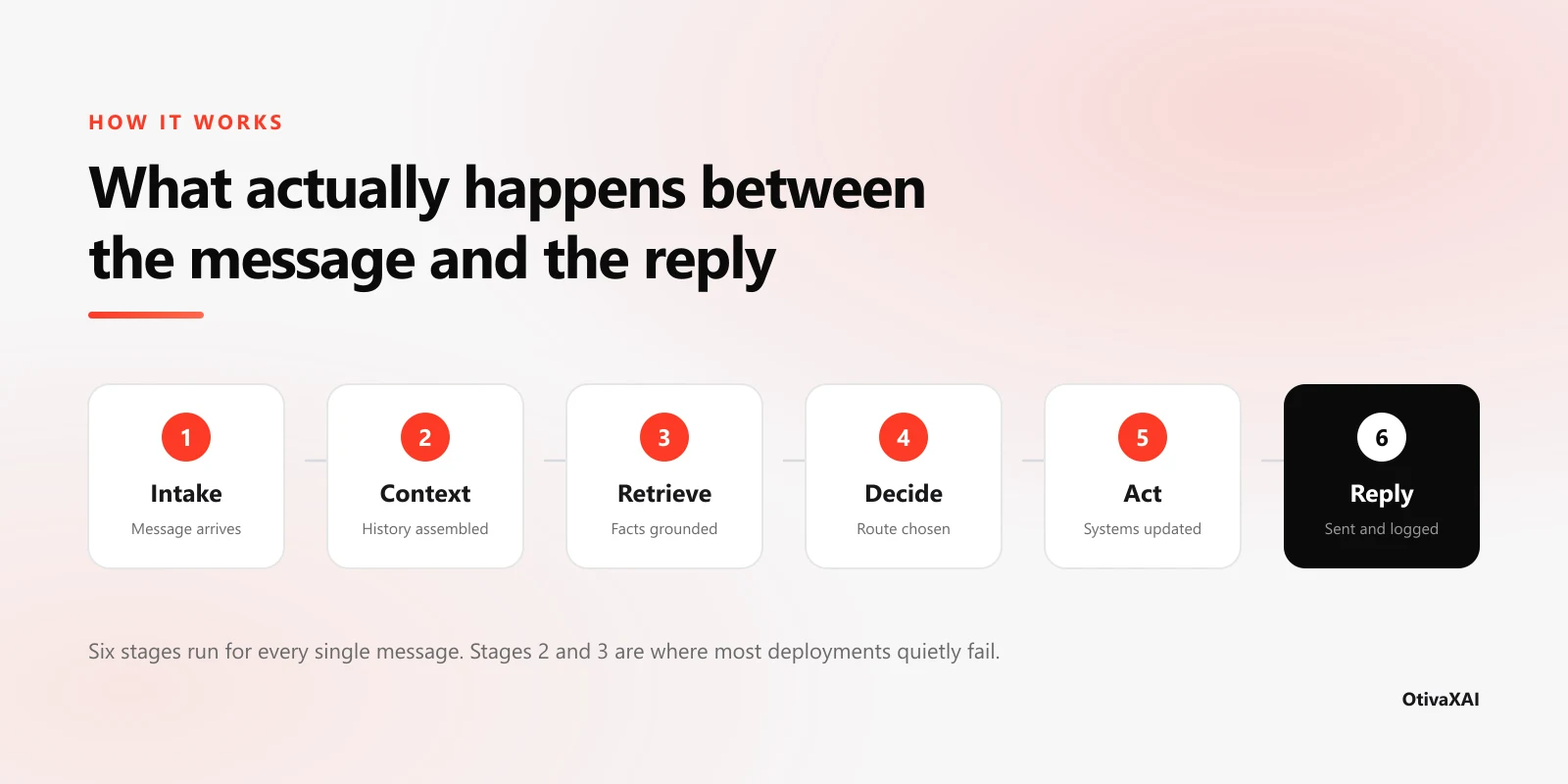
A customer sends "do you have anything Thursday morning?" and gets a confirmed appointment back before they've put their phone down. Between those two moments, six distinct things happened in a fixed order. Knowing what they are is the difference between buying an assistant that works and buying one that confidently quotes last year's prices. Our guide to AI virtual assistants for business covers what they are and what they cost; this one opens the box.
The short version
- Six stages, every message Intake, context, retrieval, decision, action, reply. No stage is optional, and skipping one shows up as a specific customer-facing symptom.
- Stages 2 and 3 decide quality How the conversation is reassembled and how facts are looked up matter far more than which language model is underneath.
- Grounding reduces invented answers, it doesn't remove them Commercial retrieval-backed tools still hallucinated on 17–33% of queries in a Stanford study.
- Long conversations are the weak point Across six tasks, the same models scored 39% lower in multi-turn conversation than on single-turn instructions.
- Vendor "resolution rates" are not comparable What counts as resolved is a definition each vendor sets for itself. Check the definition before you compare the number.
Step 1 — Intake: the message is normalised
By the end of this stage the assistant knows three things: what was said, which channel it came from, and who is saying it. Nothing useful can happen before all three are settled.
A message from your website widget, a WhatsApp message, and an Instagram DM arrive in completely different shapes. The intake layer flattens them into one internal format, then resolves identity — matching the phone number or email against existing records so a returning customer isn't treated as a stranger. It also handles the unglamorous cases: duplicate webhook deliveries, a customer sending four messages in a row before the assistant has replied to the first, voice notes that need transcribing.
The visible failure here is the assistant that greets a customer of three years with "Hi! Can I take your name?" That isn't the AI being stupid. That's an identity lookup nobody wired up. When we build multi-channel agents, this stage is usually the least interesting to talk about and the first one to cause complaints.
Step 2 — Context: the conversation is reassembled
Language models are stateless. They remember nothing between messages. So before every single reply, the system rebuilds the whole conversation from storage and hands it over again: previous turns, the customer's record, the current booking state, and the instructions defining how the assistant should behave.
This is the stage most buyers never think about, and it's where quality quietly degrades. Researchers at Microsoft Research and Salesforce simulated more than 200,000 conversations. The same models scored 39% lower on average across six generation tasks when instructions arrived over several turns instead of all at once (Laban et al., LLMs Get Lost in Multi-Turn Conversation, May 2025). The drop wasn't mainly a loss of capability — it was a rise in unreliability. Their blunt summary: when models take a wrong turn in a conversation, they get lost and don't recover.
In practice, that's why a well-built assistant summarises and prunes instead of replaying every message verbatim. It's also why it confirms details back to you — "just to confirm, that's Thursday the 14th at 10am" — rather than assuming the thread stayed coherent.
Step 3 — Retrieval: the answer gets grounded
Before the assistant writes anything, it searches your documented material and pulls back the passages relevant to the question. Only then does the model draft a reply, using those passages as its source. The technique is called retrieval-augmented generation, and it is the reason an assistant can quote your Tuesday opening hours when no model was ever trained on them.
It also has a well-documented ceiling. Stanford's RegLab tested commercial legal research tools — products built on retrieval, and marketed as avoiding hallucination. Lexis+ AI still produced misleading or unsupported answers on 17% of queries, and Westlaw's AI-Assisted Research on 33%. GPT-4, with no retrieval at all, managed 43% (Magesh et al., Journal of Empirical Legal Studies, 2025).
Two lessons follow. Retrieval is a large improvement over an ungrounded model, and it is not a guarantee. That is precisely why a business assistant should be scoped narrowly enough that the retrieval step almost always finds a clean answer, and instructed to escalate when it doesn't.
An assistant that says "let me get someone to confirm that" is worth more than one that guesses correctly nine times out of ten.
Step 4 — Decide: answer, act, or escalate
With the question understood and the material retrieved, the assistant picks one of three routes: answer directly, call a tool that does something, or hand over to a person. This routing decision is the single most consequential step in the chain, because the other two options are only as good as the choice between them.
It is also the step the research says is hardest. The Berkeley Function Calling Leaderboard, the standard academic benchmark for tool use, finds that leading models handle single-turn tool calls well while memory, multi-turn decisions, and knowing when not to act remain open problems (Patil et al., ICML 2025). Restraint is genuinely harder for these systems than action.
Which is why escalation rules should be written as explicit boundaries rather than left to the model's judgement. Anything involving a refund, a complaint, a discount, a medical or legal question, or a price the retrieval step couldn't find should route to a human by rule, not by inference.
Step 5 — Act: something changes in a real system
This is the stage that separates an assistant from a well-read chatbot. The model emits a structured call — check_availability, create_booking, update_contact — and your systems execute it. The calendar slot is held. The CRM record is written. The follow-up automation is triggered.
Real-world side effects need real-world safeguards, and this is where the engineering time goes. Check availability again before confirming. Make repeated calls safe, so a duplicate webhook can't create two bookings. Fail loudly to a human when an integration is down, instead of telling the customer it's all sorted. Our walkthrough of what an AI booking agent actually does follows one of these action sequences end to end.
Step 6 — Reply: drafted, checked, sent, logged
The model writes the reply using the retrieved material and the action result. That draft passes whatever guardrails you've set, goes out on the channel the customer used, and the whole exchange is logged.
The logging isn't an afterthought. It produces the numbers you'll be judged on, and those numbers are slipperier than they look. Intercom reports that its Fin agent averages a 76% resolution rate across more than 12,000 customers (Intercom, retrieved 11 August 2026). But resolution is a definition, not a measurement. Support platform Lorikeet points out that Intercom's figure counts procedure handoffs as billable outcomes. It also notes what deflection really means — the metric many vendors quote only tells you the customer stopped talking to you, which includes everyone who gave up and phoned instead (Lorikeet, 2026).
So when a vendor quotes you a resolution rate, the useful follow-up is not "how did you get that number?" but "what counted as resolved?"
Where the six steps actually break
Almost every disappointing deployment is a specific stage failing, not "the AI isn't good enough". The symptom usually tells you which one.
- Stage 1 — no identity resolution Symptom: returning customers are asked for details you already hold, and context is lost when a conversation moves channel.
- Stage 2 — history handled badly Symptom: it was fine for three messages, then started contradicting itself or forgot a detail confirmed earlier.
- Stage 3 — thin or stale knowledge Symptom: vague, waffly answers, or a confidently quoted price that changed in March. The most common failure, and the most fixable.
- Stage 4 — no explicit boundary Symptom: it attempts a refund negotiation or a medical question it should have escalated on sight.
- Stage 5 — integrations not wired Symptom: it talks well and does nothing — "I've noted that down" when nothing was written anywhere.
- Stage 6 — no logging or review Symptom: nobody can say whether it's working, so nobody improves it, so it slowly stops working.
Read that list against any demo you're shown. A demo exercises stages 3 and 6 beautifully and rarely touches 1, 4 and 5 at all.
What this means when you're buying one
Six stages give you six questions, and they're better than any feature list:
- How will it know who is messaging? Stage 1 — ask what it matches against, and what happens across channels.
- What does it do with a long conversation? Stage 2 — ask how history is handled once a thread runs past a dozen messages.
- Where do the facts come from, and who updates them? Stage 3 — ask who owns the knowledge base after launch.
- What is it forbidden from answering? Stage 4 — if there's no list, there's no boundary.
- What can it actually change in my systems? Stage 5 — "it can answer questions about bookings" is not the same as "it can book".
- What counts as resolved? Stage 6 — and can you read the transcripts yourself?
At OtivaxAI we build in that order, and we deliberately get stages 1 through 4 right for a single conversation type before widening the scope. It demos less impressively than an agent that claims to handle everything. It survives contact with real customers considerably better. If you want the commercial picture rather than the mechanics, our pricing page sets out what a build of each scope costs.
See these six steps running on your enquiries
Book a free 20-minute demo and we'll walk one of your real customer questions through all six stages — and tell you which ones your business actually needs.
Book a Free DemoFAQs
How AI assistants work, answered
It looks the answer up before it writes. Your documented material — prices, hours, policies, service area — is stored in a searchable index, and each incoming question triggers a search against that index. The passages that come back are handed to the language model as source material, so the reply is written from your documents rather than from the model's general training. This is why a thin knowledge base produces thin answers no matter how capable the underlying model is.
Usually a few seconds end to end for a straightforward question, and longer when the assistant has to call an external system such as a calendar or CRM. The reply often feels faster than it is because most chat interfaces stream text as it's generated, so the customer starts reading before the assistant has finished writing.
Grounding the reply in retrieved documents is the main defence, but it's a reduction rather than a cure. A Stanford RegLab study of commercial legal research tools that use retrieval found hallucination rates of 17% for Lexis+ AI and 33% for Westlaw AI-Assisted Research, against 43% for GPT-4 without retrieval. In a business deployment the practical safeguards are narrowing what the assistant is allowed to answer, requiring a retrieved source before it states a price or policy, and escalating anything outside that boundary.
It should escalate — hand the conversation to a person along with a summary of what the customer wanted and what has already been tried. The quality of that handoff matters more than the automation percentage, because a customer who has to repeat everything to a human has had a worse experience than if the assistant had never replied at all.